Key Features
quotation markLabSoft LIMS has made data retrieval and analysis so much easier for our lab. You have made it truly easy to store and review data by the use of the Query feature to prepare any kind of data comparison with just the press of a button. The best part is the easy to reach, friendly Customer Support. Always with the right answers!! quotation mark

Dawn Thomas
Quality Assurance Chemist
Degussa - Midwest Lysine

Tools


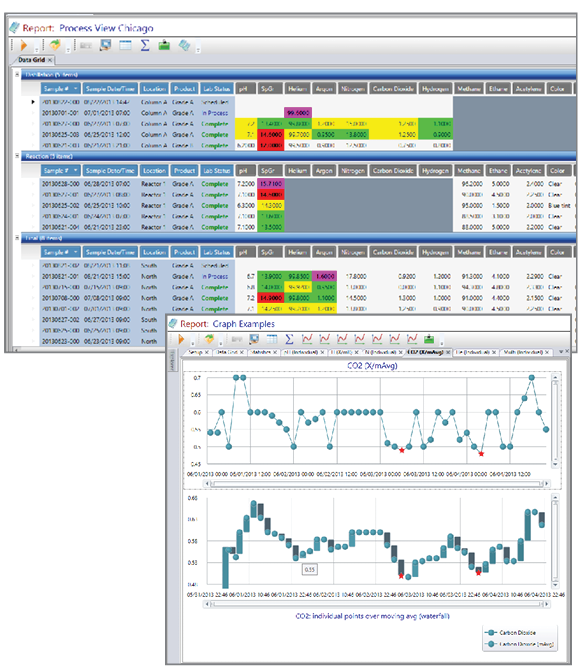
LabSoft LIMS supplies a vast range of powerful tools for viewing, printing and graphing information. The integrated tools package allows LabSoft LIMS to report the data along with Specs, Notes, Assignable Cause events, Action Taken events, etc. Because it is a non-proprietary database, the data is available to 3rd party report writers (i.e. Crystal Reports) and query tools.

LabSoft LIMS Software Images
  • Properties
    The Properties drilldown window is available throughout LabSoft LIMS. All related information about a test can be accessed through this window such as who entered it, previous values, Notes, Action Taken, Assignable Cause information, Control Limits, Representative, Instrument Validation, etc.

  • Query
    A powerful reporting, graphing and statistical tool.

  • Browse
    Quick and easy result retrieval. Browse can be used to quickly export data to Excel, view scheduled tests that do not have results, view data/tests by shift, find when the last sample was logged for a test, and retrieve data from an External Data Source such as a data historian.

  • Work List
    Flexible tool used to build electronic lists with precise information based on distinct criteria.

  • Process View
    Real-time data viewing screen with automatic refresh. Powerful tool commonly used in process control rooms for real-time lab data.

  • Control Charts
    Graphing/Auto-analyzing tool that checks for runs & trends.

  • Scheduler
    Schedule jobs to automatically run at a desired frequency or run them manually. "Scheduled Jobs" can perform different types of operations: Trend Notification, DataPort, create Sample Sets, run Queues, run Scripts, or run custom interface modules.

  • NR
    A Noncompliance Record (NR) management tool used to store, access, and report NR data.

  • Spec History
    Spec management tool used to view the specification history of manufacturing, customer and sales specs displaying information such as who submitted the spec and who approved the spec.

  • Results Tracker
    Lab management tool that displays sampling disposition:  # of Tests Completed, # of Tests Incomplete, etc.

  • Result Report
    Highly configurable report with many uses such as a "lab worksheet" with a Bar Code label printed on the Results Report or to summarize "Lot" sampling status/disposition.

  • Queue
    Advanced tool which allows a "Queue Set" to be configured to systematically execute a series of Tools with associated sets such as Action Taken Report, Results Report, Assignable Cause Report, Label, Control Chart, etc. These Queue sets can then be called from toolbar buttons, user task lists, or Results Entry events. For example, a toolbar button called "My Weekly Reports" could be configured such that once clicked would prompt for a Start/Stop range and then automatically execute and print out a series of Reports, Plots, Result Reports, Control Charts and then call Microsoft Excel.
^ Top ^
 
LabSoft LIMS Software printer page
REQUEST INFO  •  ONLINE DEMO  •  CONTACT US  •  SITE MAP  •  HOME

LabSoft is a registered trademark of Computing Solutions, Inc.   (Other brands or product names are trademarks or service marks of their respective owners, should be treated as such, and may be registered in various jurisdictions.)
Copyright © 1990 - 2012 LabSoftLIMS.com